
Do not open a hard drive at home
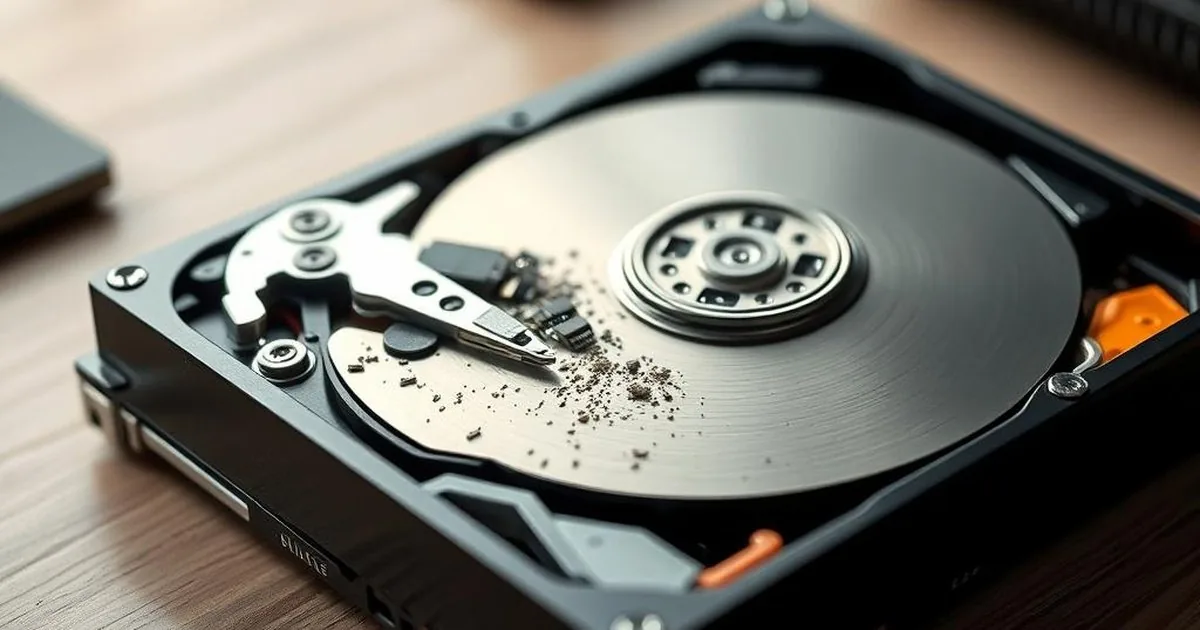
A hard drive starts clicking in a Warsaw flat, and a video online says the cover can be removed with a screwdriver. That is the moment to stop. Inside an HDD, one dust particle, one fingerprint or one wrong head movement can damage sectors that were still readable.
Opening an HDD outside controlled conditions can introduce contamination and increase the risk of platter surface damage. If the drive clicks, does not start or is not detected, unscrewing the enclosure at home usually makes the situation worse. HDD diagnostics.
Why opening a drive at home increases data risk
The safest first move is to stop testing, disconnect the media and write down the symptoms before diagnosis. This article explains why the inside of an HDD needs controlled conditions and when the right path is
Hard-drive heads fly extremely close to the platters while the surface spins at thousands of revolutions per minute. A speck of dust, hair or tool mark can become an abrasive point. The next spin-up may turn a small mechanical fault into a platter scratch and close access to part of the data.
Typical home repair mistakes
The most common problems are removing the lid, touching the plate, moving the head, shaking the disc and running it at such speed. Each of these moves can increase the number of damaged areas or hinder a stable reading.
If the storage device has mechanical symptoms, the aim is not to return the disk to the user's work, but to prepare it for safe reading. First, it is important to limit the work of the storage device and to describe symptoms: sound, fall, power outage, lack of detection or errors of the CRC. Therefore, the evaluation is performed before the next launch, not after a series of home tests.
What can happen after the cover is opened?
The most common mistakes are removing the cover, touching the platters, moving the heads, shaking the drive and powering it again after the attempt. Each of these actions can increase damaged areas or make stable reading harder.
If the media has mechanical symptoms, the goal is not to repair the disk for normal use. The goal is to prepare it for the safest possible read. That decision should be made before the next spin-up, not after a series of home tests.
What to do instead of opening an HDD at home
If the disc releases disturbing sounds, disappears from the system or suspends the computer, the safest way is to disconnect it and do not continue testing. Prepare the disk model, description of the behavior and information whether the storage device was dropped, flooded or already broken.
It is worth noting whether you have previously appeared CRC error when copying files, a message about formatting or tapping heads. Such context is more important for the laboratory than another test for life.
What does the lab think of such reporting?
Opening a drive in poor conditions can lead to several unwanted effects. The main risk is the extremely sensitive platter surface where the data is stored. Even a tiny particle or hair can scratch it. Such damage is often irreversible and can turn years of work into permanently lost data.
If you already have a photo, do not press it again, don't move the head and don't run the disk for a moment. Protect the paperweight from dust, save what has been done, and transfer this information when reported. Honesty in the description of earlier trials is more important than a perfectly sounding story.
If you want to assess the case safely
The decision to "just see what is inside" often ends with avoidable permanent damage. Curiosity is not a diagnostic method when the only copy of the files is on the platters.
In similar situations, related materials are helpful:
If you want to assess the case safely
The key lesson is simple: the most expensive mistake in a data emergency is panic testing. The most cost-effective and safest step is to disconnect power and let specialists preserve the storage device before corrosion and unstable voltage do more damage.
If internal access is necessary, it should be done by a laboratory engineer with the equipment, filtration and procedure to run a controlled process. That is the only realistic way to preserve the chance of data recovery.
Why one dusty incident is enough
In the hard drive disc head work... very close to the surface of the plate. Fine dust, touch the plate, move the arm or start the noose after opening can leave A trace that is not visible to the naked eye, but that matters when reading. Therefore, opening outside the laboratory is not a neutral curiosity; it changes the working conditions of mechanics.
The most risky is the combination of several actions": the photo covers, moved heads, compressed air blowing, turning again and starting disk on the computer. In that case, the description of the sequence of events is more important for the technician than the attempt to re-establish the disk to the previous appearance.
What to do after opening the disk
- do not connect it again to power, even for a moment,
- do not clean plates, do not touch the surface and do not move the head,
- protect the casing from dust and describe exactly what was done,
- indicate the most important data to recover, because the range of work may depend on the surface condition.
This does not prejudge the outcome, but provides a reliable starting point to assess the effects of prior interference.
Why a sincere description of earlier trials helps
After opening the disk a lot of people try to minimize the subject because they are afraid of grades. The diagnosis is not about assessing decisions, it's about determining risks. The information whether the plates were touched, whether the disc was launched after opening and whether the compressed air was used, influences the safety of the storage device.
If you do not remember all the details, describe what you are sure. Better is the short, honest note than another one would have to return the disk to the previous state.
If the disk has been opened out of curiosity, do not try to "see if it works". In such a situation, one calm decision is better than a series of minor amendments: secure the legacies, save the facts and allow to assess whether further work still makes technical sense.
If the platters were exposed, the drive was powered on after opening, or there are visible marks from touching the surface, do not return to home experiments. Protect the drive from more dust and transport it for diagnosis in the most stable condition possible.